Final Project: “Westron Wind” (5/7/19)

My story board

Explanation:

I’m an English minor and read a lot of poetry in my spare time so I wanted to do something with that. My goal was to really work the lighting and shading and the quality to make it nice and do the poem justice, especially since I hadn’t done much with lighting and shading in my other projects. This however, came at a price because it took over 8 hours to render… I think it was worth it though because I think it turned out looking really good. I did all of the lighting and shading myself as well as the scoring for the sounds in the background of the poetry reading. I felt like the scoring was also really important with an animation like this because sounds really enhance an animation. I worked really hard to get the sound as I wanted it and I think it did its job well in the background.

The Final Product

Models and Sounds Used:

Project 6 (4/18/19)

Python Scripting Dominoes

Related image
Me when I re-run the script after being given errors and it still didn’t work.

I used a cube that was stretched really far to knock over all the dominoes. I colored it red so it didn’t blend in with the boring grey plane underneath the dominoes. I was going to color the plane but I felt like grey was the most neutral color that wouldn’t interfere with any colors in an image that a user might upload.

Such wow. So satisfying.
A different angle.

Project 5 (4/2/19)

Rube Goldberg Machine

Original story board that I didn’t really stick to because Maya was fighting me.

Moving Objects

  • The ball that starts the animation
  • EACH AND EVERY DOMINO SHOULD COUNT AS ONE BECAUSE THAT’S PROBABLY WHAT SLOWED EVERYTHING DOWN AND GAVE ME SO MUCH TROUBLE
  • The three dominoes that get bigger that were separate from the ones created by the snapshot
  • The second ball that the domino hits that goes down the wedge
  • The plank/cube thing that spun around on the hinge
  • The third ball that gets hit by the plank thing, goes down the little slide and into the red solo cup

Issues I Had

I ran into a lot of issues with Maya running in general. I discovered that the more objects that had gravity the more Maya was going to fight me and make my computer sound like an airplane taking off. So with all the dominoes it was really bogging my system down and was even having issues just playblasting the animation. Eventually I just rendered all the images out and by SOME MIRACLE it actually worked. I also had issues with the speed and gravity since apparently 9.8 isn’t actually a realistic gravity magnitude in Maya. Upping it to about 80 made it pretty reasonable. Doing this might also be what made Maya scream. Who’s to say. ¯\_(ツ)_/¯

Imported object link: https://www.cgtrader.com/free-3d-models/household/kitchenware/plastic-cup-b6bb194e-6a67-464a-a1c3-ac0f119ca068

The Animation (Updated)

I added more of a setting so it’s on a table and better lighting. I couldn’t really get the quality to be any better though.

The Animation (Old)

I’m sorry it’s so long. I couldn’t actually see what was happening for the most part so I kind of just rendered it out blind and hoped for the best lol.

Project 4 (3/19/19)

Original Rollercoaster

Not gonna lie… This one gave me some problems and I had a few mental breakdowns making it. I had so much trouble adjusting the motion path and getting to be oriented in the way that I wanted. Tracks would start twisting, my locator would go way too fast and would throw everything off, and the tracks were overlapping too much. I wanted to do so much more than this, but this is what I have for now.

The three principles of animation I used are the following:

  • Arcs: There are numerous curves and hills that form arcs for the rollercoaster. Additionally in the original version the camera flies off the track in a big arc before it hits the ground.
  • Slow In and Slow Out: The camera slowly starts moving in the beginning and finishes slowly as well since this is more realistic to an actual rollercoaster
  • Anticipation: The camera waits a few seconds before moving up the first big hill.
This is my original storyboard. It fits more to the original animation with the broken rollercoaster. I felt like it would make sense for a sketchy roller coaster to have a car accidentally fly off since it is so sketchy.

Old Version:

I tried.
¯\_(ツ)_/¯

New Rendered Version:

This version is rendered out and has better lighting and textures. The rollercoaster also isn’t as broken and shows the full ride.

Project 3 (2/28/19)

Cannonball!!

This is the storyboard I drew before I started the animation. I already had an idea of what I wanted to do. I did not follow the tutorial in the book. I just made this crude drawing and started animating. Please don’t be offended by my bad drawing skills or handwriting.

Squash and Stretch

One of the easiest principles to implement was squash and stretch. As shown above, I made the most dramatic stretch when the ball shoots out of the cannon and then the biggest squash after the cannonball’s first bounce off the ground. Since cannonballs are made of metal and are pretty heavy they don’t really bounce that much so I tried not to exaggerate the squash and stretch too much.

Anticipation

As the cannon gets ready to fire, it shakes and shrinks into itself. I made it do this slowly to make it more dramatic and build up anticipation.

Staging

For the staging principle, I implement this by using two main camera angles in my animation. When the animation first starts, the cannon is the largest thing in the shot so the viewer’s attention is on it but you can still see the hole in the distance, which initially sets the scene. Then the second shot flips so the hole is the biggest thing in the scene. A few seconds fter the camera shifts, the cannonball finally bounces into the shot and then into the hole.

Exaggeration

When the cannon fires, it extends a bit before shrinking back to its original position. The whole cannon firing sequence is also exaggerated since cannons don’t really shake and shrink and stretch like this in real life.

The Actual Animation:

As a final note, I also use secondary action and arcs in my animation. After the cannon fires, the cannon bounces back a bit in small arcs since this kind of cannon wouldn’t just sit still with that big of an explosion and that much build up. This is also a secondary action to the cannon firing the cannonball. I didn’t follow the bouncing ball tutorial in the book, but I think it might have made this a bit easier if I had since I animated the ball first and then the extra cannon animations which messed up the ball animation several times. I also wanted to add water in the hole but I couldn’t figure out how to do this even with some tutorials.

Link to Cannon Object: https://www.turbosquid.com/FullPreview/Index.cfm/ID/547487

Project 2 (2/14/19)

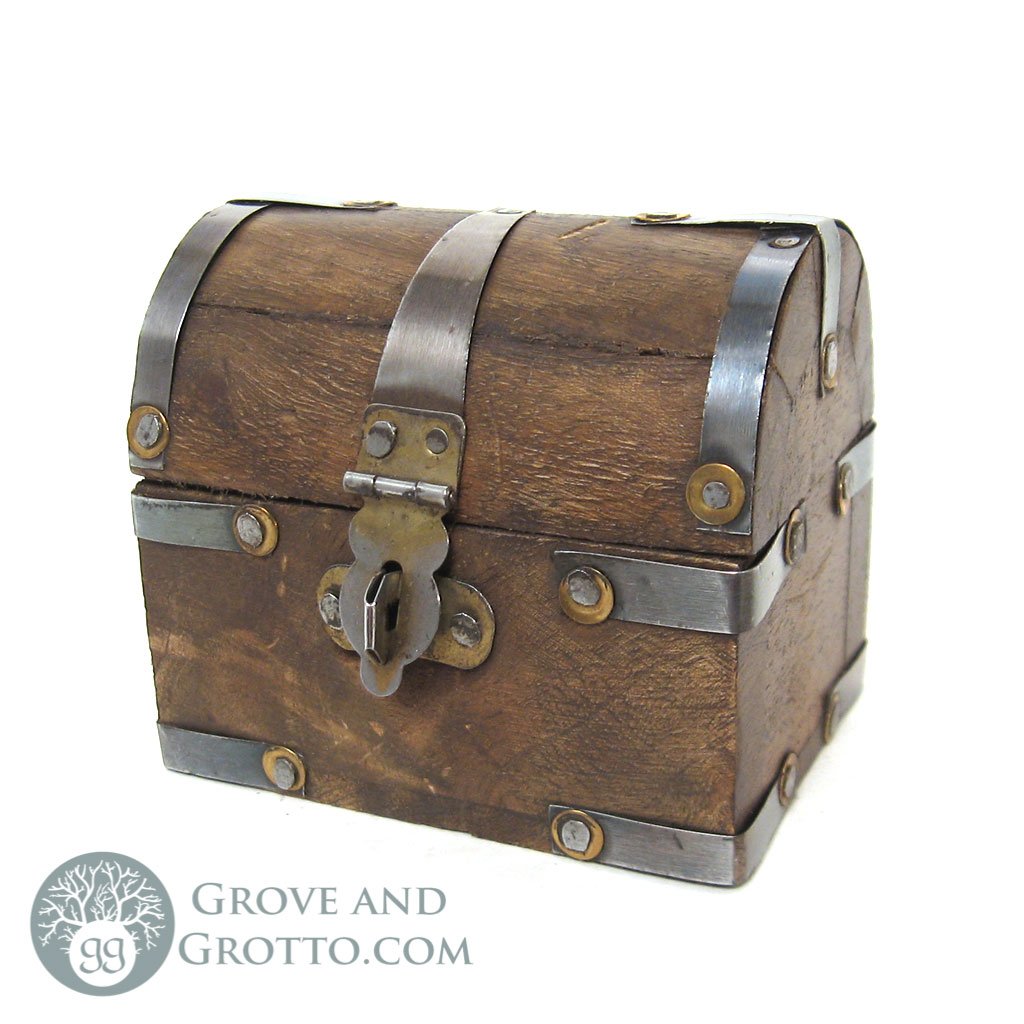
This is my reference photo.

The hardest part of this whole project was definitely figuring out the different tools since that’s what took me the longest. It took a lot of finagling to get the metal straps around the chest to bend the way I wanted them and to get the chest into the rounded shape I wanted with the bend tool. Additionally, I had a lot of issues with Maya just randomly crashing on me when I tried to do certain things such as smoothing the shapes and inserting all the coins. Sometimes shapes would just randomly crumble or stretch themselves out across the screen with no reason. I think It may have had something to do with the coins that I downloaded since it kept giving me a warning about ray tracing, but I’m not sure.

Here is a link to the coins: https://www.turbosquid.com/FullPreview/Index.cfm/ID/880336

This is the shaded model.
This is the wireframe view of the model.

As a final reflection, there are definitely some things that I’m not really pleased about with my model. The biggest thing is the texture of the wood. For one thing, it is too shiny and looks like plastic. Additionally, I couldn’t get the sides of the chest to texture right so they have this weird grainy look that I couldn’t change without it messing up the shading for the rest of the chest.

Project 1 (1/31/19)

The tutorial that we had to follow was pretty straightforward and I really didn’t have much trouble with this part. It wasn’t until I had to do things on my own that I started to run into issues. My biggest issue was the hierarchy when I added new moons and tried to move things around (just like the textbook said would happen). Things kept getting left behind because I would forget to include it in the tree or select the group or something along those lines. After messing with it for a while I think I have a better grasp on it.

This is my animation after the tutorial. (I don’t know why youtube decided to add those weird 8 seconds at the end. I wasn’t getting this issue with the original avi file after the playblast. It does this every time I try to re-upload the video.)

Here is a list of all of my changes. The images along with their explanations are provided below:

  • Planet sizes
  • Jupiter getting an extra move that rotates around the x-axis instead of the y-axis
  • Making the planets orbits more proportional to real life
  • Making the sun bounce and having the other planets bounce and snake behind it.
Two changes I made can be noted here. First of all, I decided to enlarge Jupiter and Saturn quite a bit compared to the others since in real life they are quite big. I remember reading somewhere that if conditions had been slightly different during the creation of the universe then Jupiter could have been its own star! (Don’t quote me.) Pluto is also bigger because I felt like it should get the chance to live its dream and be a big planet too. My other change pictured here is the extra moon that orbits Jupiter. However, instead of orbiting around the y-axis it orbits around the x-axis around Jupiter.
This is a top view of my solar system that shows another change I made. The tutorial had all of the planets orbiting at the same speed in a line. To make it more realistic I changed each planet’s orbit to be more proportional to what they are in real life (but obviously not in real time speed). Pluto takes the longest to orbit around the sun and then Mercury takes the least amount of time which is what is pictured here with the planets staggered.
My last change was a bit hard to get a picture of because of the orbits, but you can kind of see it here. At first, I wanted the planets to be bouncy balls but then decided what I was doing made them look too chaotic while orbiting the sun. So what I did instead was have the sun be like a bouncy ball and then have all the other planets snake behind it. I did this by just translating each planet and the sun along the y-axis but staggering them by 5 frames each so they bounced one at a time. I thought the effect was cool. This is where I ran into the hierarchy issue a lot though because I wasn’t paying attention. Moons kept getting left behind.

The animation with my adjustments is shown below:

This is my animation after adding my changes.